Monday, 28 February 2011
In my last post, i blogged about UTM’s which got a fairly positive response over mail :) . 
Later on as technology evolved, and hardware routers came into scene, hardware firewalls arrived which were nothing more than routers with packet filtering capabilities. Furthermore, the technology matured from basic packet filtering to a more complex control technology which included stateful packet inspection and finally to full application layer inspection devices (IEEE, 1997). Around the year 2000, VPN’s appeared and gained acceptance as the mainstream technology to connect networks securely, remotely. Firewalls followed closely by integrating VPN’s with Firewall which was the natural choice as enterprise solutions required both firewalls and VPNS.

As the prices for bandwidth fell along with the cost of cryptographic hardware needed to encode and decode the traffic, the need for specialized hardware rose which may be used to accelerate the performance.
Unified Threat Management
In mid 2004, International Data Corporation (IDC) defined UTM platforms as to minimally include firewall, VPN, intrusion prevention and antivirus features. Touted as “Next Generation Firewalls”, we have two approaches to design the UTM’s since their inception.
- Licensing and Integrating Approach (Multi vendor UTM)
- In-house Development Approach (Single vendor UTM)

The above figure illustrates the core architecture and development approach of developing UTMs
Licensing and Integrating Approach (Multi vendor UTM)
The first design approach tried to get the best of worlds by integrating specialized technologies from different security vendors. For e.g.:
Cyberoam UTM licenses Antivirus from Kaspersky, AntiSpam by Commtouch , both who specialize in Antivirus and AntiSpam technologies.
These UTM’s provided an integrated interface to manage all the integrated technologies in the easiest possible manner, while some others require specific management interfaces.
| Advantages | Limitations |
|
|
|
|
|
|
|
|
|
|
|
|
|
|
In-house Development Approach (Single vendor UTM)
| Advantages | Limitations |
|
|
|
|
|
|
|
|
| |
|
In my next article I will be discussing more about UTMs. Please add your points so I can make it better.
Stay tuned.
Monday, 28 February 2011 0
Saturday, 26 February 2011
 technologies which I would like to share out with you. I am working along Amarjit Singh & the rules of the game are simple, he will create a security scenario while I will try to break it. Considering I am a bit novice in network technologies, it has been a highly learning experience with some really great hands on tech demos & real life scenarios. I will be explaining about Unified Threat Management (UTM) today which you can think of an all in one solution to an organizations security needs. Unified Threat Management devices are relatively new in the security appliance scenario & are in the phase of continuous evolution. UTM has attracted industry leaders like Juniper, Fortinet, Cisco, IBM, Intel, Cyberoam & there are a lot of UTM products to choose from. I am however working on the Cyberoam one & will be continuing my tests on it.
A brief history
Earlier, the enterprise security scenario was divided into traditional firewalls & targeted applications like Antivirus, Anti spam & Intrusion Detection Systems.

However in 2004 , a new trend emerged which combined multiple security features into one single hardware platforms thereby eliminating the need of machine to machine protection.

Since its inception, UTM’s are one of the fastest growing segment in the security appliance sector.
Why UTM ?
- UTM’s provide one stop solution for security needs of an organization.
- The integrated approach allows the administrator to worry about only one device, not the whole flurry of firewalls, antiviruses & IDS/IPS.
- Increase in blended attacks against organizations has led to older specialized protection devices/services obsolete.
- Cost effective , tell me one thing, which will be more costlier ? One decent firewall, site licenses of Antivirus, Anti spam, Anti phishing, IDS, IPS etc or a single UTM device with combined subscription costs ? The answer is the second one :)
- One stop reporting solution.
Saturday, 26 February 2011 0
Thursday, 24 February 2011
Hi friends, I am free this weekend :) & i believe most of you will be too. So, why dont you catch up with me at 
About Maipu
Maipu is the China’s best network solution providers & have been serving the international market for last 18 years. At Convergence 2011, Maipu will be showcasing the “New World, New Choice” for the business.
See you there :)
Thursday, 24 February 2011 0
Monday, 21 February 2011
While I was messing with Routers & virtualisation products, I came across FREESCO which is an open alternative to 
FREESCO is based on the Linux operating system. And incorporates many of the features of other Linux distributions into software that fits onto a single 1.44 meg floppy diskette. It is also possible to run it entirely from RAM, in which case no disk activity occurs after startup. FREESCO works on any IBM compatible PC (i386 compatible spec or higher) and can be optionally installed to a hard disk. In practice this means Intel 80486SX or better, with 12 MByte. Preferably more than 16 MByte to enable servers.With FREESCO, you can configure:
- a simple bridge with up to 10 Ethernet segments
- a router with up to 10 Ethernet segments
- a dialup line router
- a leased line router
- an Ethernet router
- a dial-in server with up to 10 modems (with multiport modems).
- a time server
- a dhcp server
- a http server
- a ftp server
- a dns server
- a ssh server
- a print server (requires TCP/IP printing client software)
FREESCO also incorporates firewalling and NAT, which are resident within the Linux kernel, to help protect you and your network. All of these features can be used in conjunction with each other or individually.
Limitations
More recent versions of Linux software (e.g. Apache 2) are often not available for FREESCO because they are not compatible with FREESCO's kernel. Also, newer hardware (such as Gigabit Ethernet cards) may not be usable under FREESCO due to an absence of their drivers for the 2.0.x Linux kernel. FREESCO does not at present support load-balancing.Also, FREESCO does not support USB.
Monday, 21 February 2011 0
Saturday, 19 February 2011
Hi folks..I have started my first steps into Cisco, & would be sharing my small experiments in it. 
So, firstly download GNS3 & install it. Get IOS images from and load them (if you are really not sure of this step, mail me, I will expand the basics more)
The topology I created is this -

2 routers connected via gigabit . What we will be doing is -
- Set router password.
- Set telnet password
- Set Console Password
- Encrypt All passwords.
- Set Ip Address of routers.
Anyways, I start by right clicking on R2 router.
Connected to Dynamips VM "R2" (ID 7, type c7200) - Console port
To get into privilege mode, type this command.
R2>en
To configure router, type this command ..
R2#conf t
Enter configuration commands, one per line. End with CNTL/Z.
To set router password & encrypt all passwords type these commands
R2(config)#enable secret router2
R2(config)#service pass
R2(config)#service password-encryption
Now to set console & its password type these commands
R2(config)#line console 0
R2(config-line)#password console
R2(config-line)#login
R2(config-line)#exit
Now to set telnet (vty/virtual terminal) & its password type these commands
R2(config)#line vty 0 4
R2(config-line)#password telnet
R2(config-line)#login
R2(config-line)#exit
Once done, you can now configure the interface by typing these commands
R2(config)#int g1/0
R2(config-if)#desc ROUTER LAN 2 GIGABIT INTERFACE
R2(config-if)#ip address 192.168.1.20 255.255.255.0
R2(config-if)#no shut
R2(config-if)#
*Feb 19 19:56:42.035: %LINK-3-UPDOWN: Interface GigabitEthernet1/0, changed state to up
R2(config-if)#
*Feb 19 19:56:42.035: %ENTITY_ALARM-6-INFO: CLEAR INFO Gi1/0 Physical Port Administrative State Down
*Feb 19 19:56:43.035: %LINEPROTO-5-UPDOWN: Line protocol on Interface GigabitEthernet1/0, changed state to up
R2(config-if)#end
*Feb 19 19:56:47.723: %SYS-5-CONFIG_I: Configured from console by console
R2#
Once done, you can see the configuration by typing -
R2#show running-config
Building configuration...Current configuration : 932 bytes
!
upgrade fpd auto
version 12.4
service timestamps debug datetime msec
service timestamps log datetime msec
service password-encryption
!
hostname R2
!
boot-start-marker
boot-end-marker
!
enable secret 5 $1$trNZ$uNTgBIA1QG43/4YEB29lf/
!
no aaa new-model
ip cef
!
!
!
!
no ip domain lookup
!
multilink bundle-name authenticated
!
!
!
archive
log config
hidekeys
!
!
interface FastEthernet0/0
no ip address
shutdown
duplex half
!
interface GigabitEthernet1/0
description ROUTER LAN 2 GIGABIT INTERFACE
ip address 192.168.1.20 255.255.255.0
negotiation auto
!
no ip http server
no ip http secure-server
!
!
!
logging alarm informational
!
!
control-plane
!
!
gatekeeper
shutdown
!
!
line con 0
exec-timeout 0 0
password 7 070C2E425D061500
logging synchronous
login
stopbits 1
line aux 0
stopbits 1
line vty 0 4
password 7 06120A2D424B1D
login
!!
webvpn cef
!
endR2#
If done properly, it will look like more or less the same I have pasted above. Also, as you can see, all the passwords are encrypted. In the similar way you can configure Router 1. Make a note os passwords, I have kept quite simple passwords just to demonstrate the configuration. Please keep secure passwords , read my article on how to create secure passwords.
I hope you enjoyed this simple guide, till next time.
Saturday, 19 February 2011 0
Friday, 18 February 2011
Hi folks..
I am in a fix nowadays, I m inside a secure network which is protected by squid on port 8080 & blocks all the generic ports by default like ftp one. Since I have created a program which uses ftp (a covert program actually) it wont work on the scenario when you are behind an Intranet protected by squid nat-ted by routers (Maipu/cisco plus I am dead sure the firewall is a stateful one) .
Any ideas ? Also, I cant use a static IP program / VPN tunnels as they wont work. Cant launch a mass scale cdp based attack on the network as its an official one. Any ideas on fooling squid ?
Comments are welcome, details will be provided on program & network on request
Plus, don't expect me to reverse engineer the source code & create a custom exploit, don't have much time, don't have that patience. I might do as well, only if I am convinced that there is no other way. In the mean time, I am here for your valuable suggestions & ideas.
Friday, 18 February 2011 0
Wednesday, 16 February 2011
 Ubuntu linux to Lucid Lynx and installed Oracle Virtual Box over it. I later installed Windows XP as a virtual operating system and thought it might be better if I would install an antivirus program on it. However, as I moved my antivirus program and some other files from my USB drive, I had a gut feeling that things are just not right. So..a bit of googling landed me at Virustotal.com which allows to scan a file using multiple antivirus software, and it does what it says perfectly :)
The site is extremely easy to use, I uploaded a file over it and it took less than a minute to generate results.
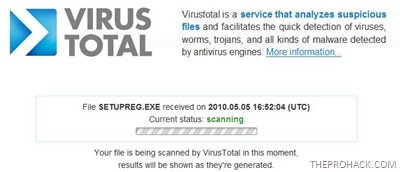
The file was found positively ID’ed by it and one antivirus triggered a positive result from a scan of 41 antivirus.

Pros
- Extremely fast scanning
- Scanning using 40+ antivirus
- complete detail about the file is provided
- Cant scan my whole PC :(
- Can only scan one file at a time
- 20 MB file limit (that means I cant scan heavy executables like that of Adobe Photoshop and Burnout Paradise)
Overall, it saved my day and is worth having a look at it . You can visit it here
Like This post ? You can buy me a Beer :)
Posted by XERO. ALL RIGHTS RESERVED.
Wednesday, 16 February 2011 0


